
 English
  Español
  Français
  Deutsch
  Português
  Italiano
  Русский
  中文(简体)
  日本語
日本語  한국어
한국어  العربية
  हिन्दी
  Nederlands
  Türkçe
  Polski
 Mac Translator App
Free AI translation built for macOS.
Linguin lives in your menu bar — always one shortcut away. Instant AI translations in 100+ languages without interrupting your workflow.
Download on Mac App Store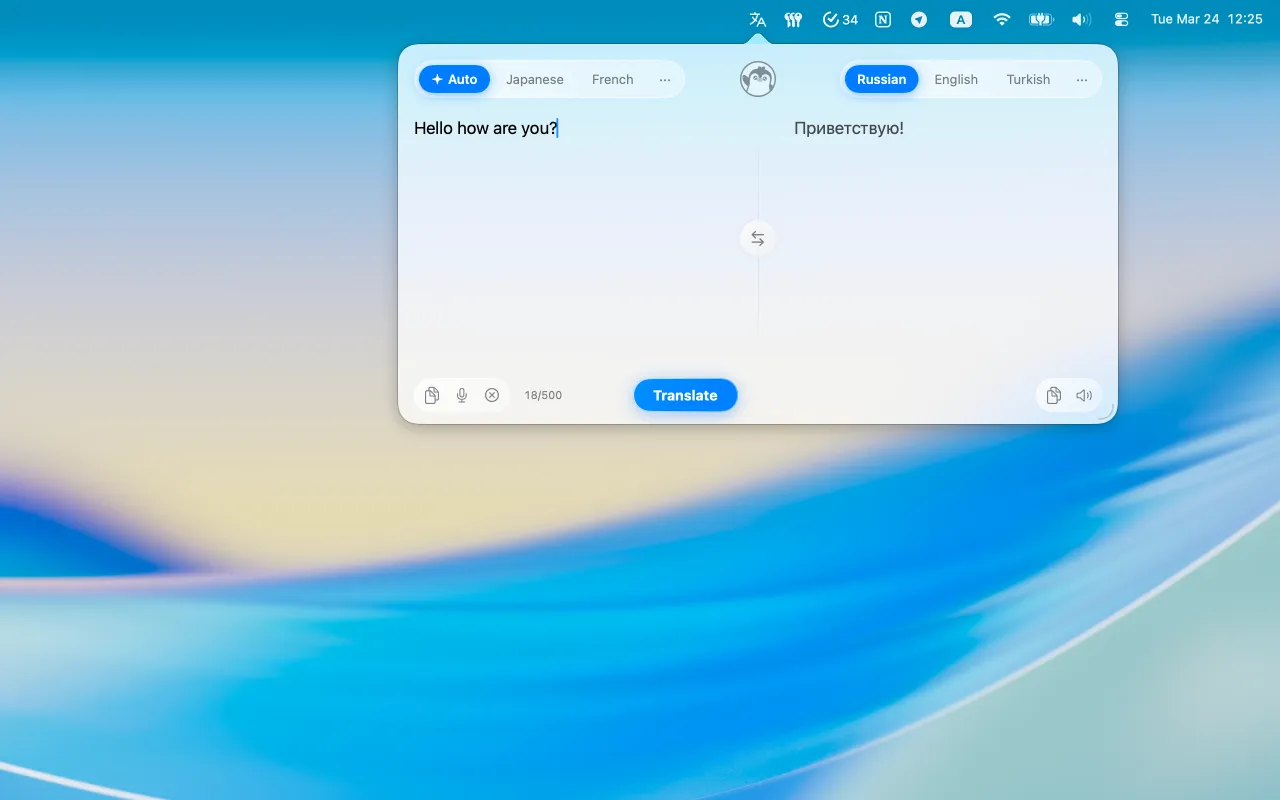
Why Linguin is the best Mac translator
Every feature is designed to fit seamlessly into how you work on macOS.
Menu Bar App
Lives quietly in your menu bar. Always one click away without cluttering your Dock or desktop.
Keyboard Shortcut
Press ⌘+Shift+T anywhere on your Mac to instantly open the translator without touching the mouse.
Auto-Detect Language
Linguin automatically detects the source language — just paste your text and get the translation.
Sidebar Translator
Open a persistent sidebar to translate while browsing, writing, or working in any app.
Dark Mode Support
Perfectly designed for both light and dark macOS appearances. Looks great in every context.
100+ Languages
Translate between over 100 languages with high accuracy powered by the latest AI models.
More screenshots


Get Linguin for Mac
Free to download and use.
Download on Mac App StoreRequires macOS 13 Ventura or later. Apple Silicon and Intel supported. Also available for iPhone, Android, and Chrome.
Frequently Asked Questions
Everything you need to know about Linguin.
Is Linguin free to use?
Which languages does Linguin support?
Does Linguin work offline?
How is Linguin different from Google Translate?
Is my data private?
Can I translate entire web pages?
Does Linguin work on iPhone?
Is there a keyboard shortcut for quick translation on Mac?
From the Blog
View all articles →
Translate Birth Certificate to English
Guide to translating a birth certificate for USCIS, passports, and legal use. Learn requirements, methods, and costs for certified English translation.
October 2, 2026
YouTube auto translate and AI dubbing guide
Learn how YouTube's auto translate and AI dubbing works, its 27 language support, and how to use it alongside tools like Linguin for better translation control.
September 25, 2026
How a video translation app works
Learn how Linguin uses AI to translate video dialogue, subtitles, and on-screen text in over 100 languages, making global video content accessible.
September 23, 2026